



Download PDF Converter Master – Fast PDF to Word, Excel, PowerPoint Converter
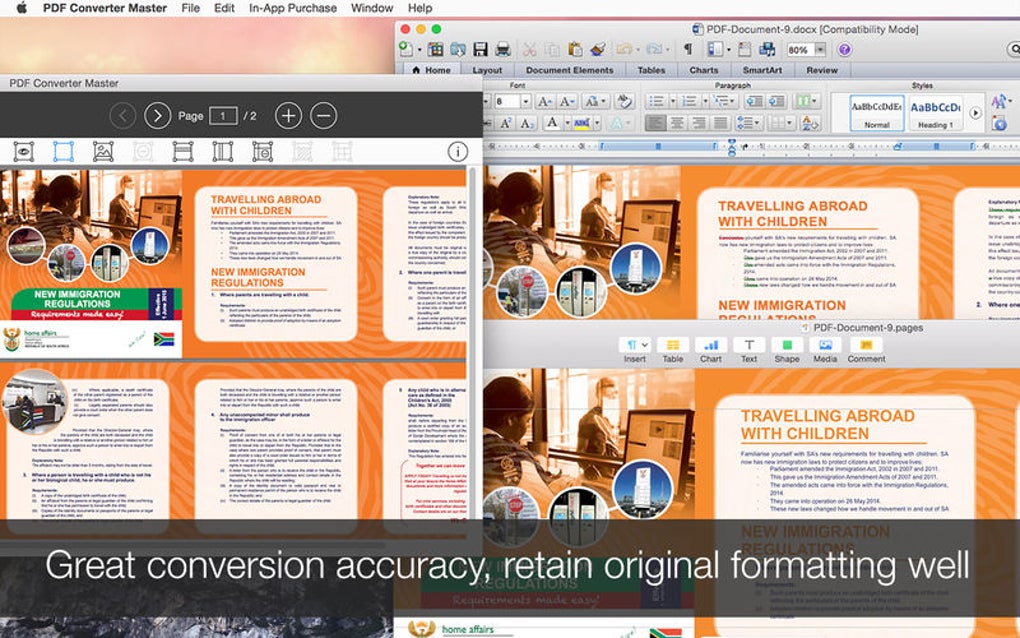
PDF Converter Master is a versatile desktop and mobile utility that lets you transform PDF files into a wide range of editable formats with just a few clicks. Whether you need to pull text into Microsoft Word, extract tables into Excel, or repurpose slides in PowerPoint, this tool retains the original layout, fonts, and graphics so the converted document looks as close as possible to the source. Ideal for students, professionals, and anyone who works with PDFs on a daily basis, PDF Converter Master offers a secure, free‑to‑download solution that runs on Windows, macOS, Android, and iOS. Its intuitive interface eliminates the steep learning curve typical of many conversion suites, allowing you to focus on getting work done instead of wrestling with software.
Key Features of PDF Converter Master
- Multi‑format conversion: Convert PDFs to DOCX, DOC, XLSX, XLS, PPTX, PPT, RTF, TXT, JPG, PNG, and more.
- Preserved formatting: The engine keeps fonts, tables, images, and page layout intact, minimizing manual clean‑up.
- Batch processing: Drag‑and‑drop multiple files to convert them all at once, saving time on large projects.
- Secure conversion: All files are processed locally on your device; no data is uploaded to the cloud, protecting confidential information.
- Cross‑platform support: Native apps for Windows 10/11, macOS Catalina and later, Android 7.0+, and iOS 13+.
- Cloud integration (optional): Directly open files from OneDrive, Google Drive, or Dropbox for quick access.
- Custom output settings: Choose page range, image resolution, and OCR options for scanned PDFs.
- Regular updates: The development team releases monthly patches to improve compatibility with the latest Office versions.
Installation, Setup, and Cross‑Platform Compatibility
Getting started with PDF Converter Master is straightforward. For Windows and macOS, download the installer from the official website, run the .exe or .dmg file, and follow the on‑screen wizard. The installer automatically checks for required dependencies such as the .NET Framework (Windows) or the latest macOS security updates, prompting you only when an action is needed. Once installed, launch the application from the desktop shortcut or the Applications folder.
Mobile users can find the app in the Google Play Store or Apple App Store. After tapping “Install,” the app requests permission to access local storage and optional cloud services. The first launch presents a brief tutorial that demonstrates how to import a PDF, select the desired output format, and start the conversion. Because the conversion engine runs locally, you don’t need an internet connection unless you choose to sync files with a cloud provider.
Operating System Support (itemprop="operatingSystem"): PDF Converter Master is fully compatible with Windows 10, Windows 11, macOS Catalina, Big Sur, Monterey, and Ventura, Android 7.0 and newer, and iOS 13 and newer. The software respects each platform’s native UI conventions, offering a consistent experience whether you’re on a desktop or a handheld device.
During setup, the program creates a default folder named “Converted Files” in your Documents directory. You can customize this location in the Settings menu, where you’ll also find options to enable automatic file naming, set a preferred language for the UI, and configure update notifications. The application checks for updates on startup; if a new version is available, a discreet banner appears, allowing you to download and install the patch with a single click.
Pros and Cons – Quick Verdict
Pros
- High‑fidelity conversion that keeps original layout and styling.
- Supports a broad spectrum of output formats, covering most everyday needs.
- Batch processing speeds up large‑scale projects.
- Local processing guarantees data privacy and security.
- Free version offers generous functionality; premium upgrade is optional.
- Regular updates keep compatibility with the latest Office suites.
- Intuitive UI reduces learning curve for new users.
Cons
- The free tier places a limit of 10 pages per conversion, which may be restrictive for lengthy documents.
- Advanced OCR features are only available in the paid version.
- Occasional formatting quirks with highly complex PDFs containing embedded multimedia.
- No built‑in PDF editor; you must use a separate tool for annotations.
- Initial download size (~85 MB) is larger than some lightweight alternatives.
Frequently Asked Questions
Can I convert scanned PDFs to editable Word documents?
Yes. PDF Converter Master includes an OCR engine that recognizes text in scanned images. OCR is available in both the free version (limited to 2 pages per file) and the premium version (unlimited). After conversion, the text is fully editable in Word.
Is the conversion process done locally or in the cloud?
All conversions are performed locally on your device. The software does not upload your PDF files to any external server unless you explicitly choose a cloud storage option for file import or export.
What file size limits does the free version impose?
The free edition allows PDFs up to 25 MB and a maximum of 10 pages per conversion. Larger files or unlimited page counts require the paid license.
Does PDF Converter Master retain hyperlinks and bookmarks?
Yes, the engine attempts to preserve active hyperlinks, internal bookmarks, and table‑of‑contents structures when converting to Word or PowerPoint formats. Some very complex link structures may need manual adjustment after conversion.
Can I try the premium features before buying?
A 14‑day trial is available directly from the application’s Settings → Upgrade menu. The trial unlocks all premium functions, including unlimited page conversion, full‑resolution OCR, and priority support.
Conclusion – Should You Download PDF Converter Master?
If you regularly need to turn PDFs into editable Office documents, PDF Converter Master offers one of the most reliable, privacy‑focused solutions on the market. Its high‑accuracy conversion engine, batch processing capability, and cross‑platform availability make it a strong contender for both personal and professional environments. While the free version’s page limit may push power users toward the paid upgrade, the cost is modest compared with the time saved on manual re‑formatting.
In short, download PDF Converter Master today to experience a seamless, secure, and feature‑rich PDF conversion workflow. Click the button below to get the latest version for Windows, macOS, Android, or iOS, and start converting with confidence.
Download PDF Converter Master






